Multiple Output Devices in Background Music
Multiple Output Devices in Background Music
Background
Background Music gives every app its own volume on macOS. It has one limitation: it can only render to a single output device. Pick the TV’s HDMI and the Bluetooth speaker goes silent, and vice versa.
The goal: the same audio on every output device at once, each at its own level. I forked it and added multi-output support. This post walks through how the pieces fit together and the gotchas worth knowing.
How it works
Background Music registers a CoreAudio virtual device via a HAL plugin. Apps render into it; the application side reads that ring buffer, applies the per-app gain, and writes the result out to the selected output device (BGMPlayThrough).
Multi-output means running one playthrough per enabled output device, each with its own gain, and then fixing everything that breaks when several devices play at once. The two things that break are sample rates and clock drift, because every output device runs on its own hardware clock at its own native rate.
Per-device controls
The “Output Device” menu section changed from a single selector to a per-device list. Each row has:
- an enable checkbox,
- a mute button,
- an independent volume slider,
plus a new Master slider for the whole mix. First launch defaults every device to 50%; from then on, each device’s enabled state, gain, and mute are persisted across sessions. When the app quits, the system’s default output (and input — see below) is restored to whatever it was before launch, so the Sound menu looks like the app was never there.
Mixed sample rates
Most output devices run at 48 kHz, but Bluetooth speakers are stuck at 44.1 kHz — a common A2DP limitation — and a single ring buffer can’t feed both natively.
The playthrough writes into the ring buffer at the primary device’s rate. Any enabled device whose native rate differs from that gets a resampler in front of it: an AudioConverter-based path that converts on the fly. The converters are pre-warmed and pre-allocated at start, because the real-time render callback is not a place to be doing malloc.
Drift correction
Drift was the real problem. Each resampled device has its own hardware clock, which does not match the write clock of the ring buffer. The resampler’s read head only ever advanced, so over a few minutes it either ran ahead of the write head (the device silently goes quiet) or fell behind (audio stalls and repeats). With a 44.1 kHz Bluetooth speaker the drift shows up quickly — audio degrades and drops out.
The fix mirrors what the same-rate path already does: when the read head drifts more than a quarter of the ring buffer in either direction, re-anchor it to the latest input sample, and reset the converter so it doesn’t replay the stale samples it had buffered. That’s roughly a 50 ms correction, which is inaudible for continuous music. The result: the Bluetooth speaker stays in sync with the 48 kHz outputs indefinitely.
Loopback input
The virtual device is also exposed as an input, and that input is a loopback of its output — it plays back what was rendered into it. I made Background Music set the device as the system’s default input too, alongside the default output. Any app can now just pick the default microphone and record the full mixed playback (QuickTime, for example).
The previous default input device is remembered on launch and restored on quit — including the abnormal-termination path, which is handled by a new XPC method in the background helper service, since the app itself is dead by then.
Before / After
| Before | After |
|---|---|
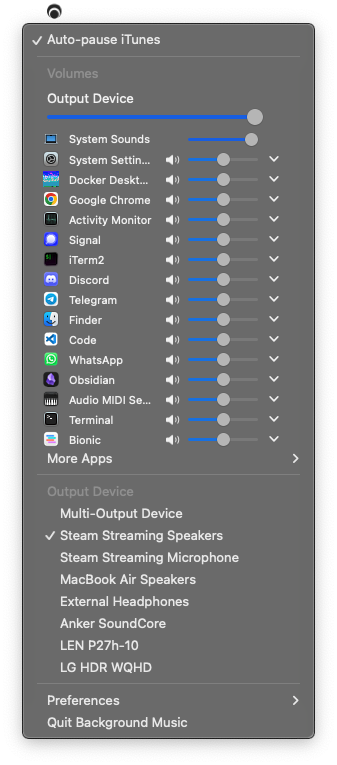 | 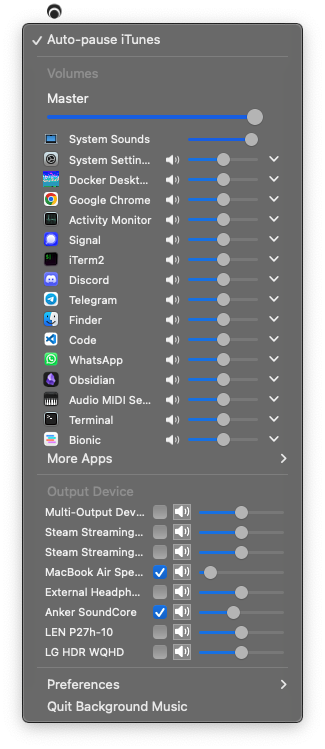 |
Gotchas
- Bluetooth is 44.1 kHz and its clock drifts. Without the re-anchor logic, a resampled A2DP sink will slowly fall out of sync and then stop producing audio entirely. If you add a non-48 kHz device to a multi-output setup, drift correction is not optional.
- Debug builds abort on any CoreAudio exception.
CADebugMacros.cppcallsCADebuggerStop()under#if DEBUG, so a transientCAExceptionin a device-notification handler kills the process. This is intentional fail-fast during development, not a bug — but it looks like a crash until you find the log line. @trycannot be paired with a C++catch. The CoreAudio exceptions are C++ exceptions, so they have to be caught withtry/catch; Objective-C exception blocks don’t see them; mixing the two in one scope is a build error.- TCC mic permission is a launch gate. The app hard-gates on input permission at startup, and re-signing the build (even ad-hoc) can invalidate the grant. A “stuck” launch that just sits at the permission prompt is the app waiting on the system dialog, not a hang.
- Ring buffer edge cases matter in real time. Out-of-range reads zero-fill, and a read that spans the whole buffer is reported as “too much” — the re-anchor logic has to handle both, or a single bad timestamp wedges the device.
Upstream
Everything is in the fork — seven commits, about 2,500 lines added, covering the per-device UI, the resampler, the drift correction, the default-input loopback, and unit tests for the mixed-rate playthrough. I’ve opened it as draft PR #882 against upstream, with the before/after screenshots above. edit history: _posts/2026/11/multi_output_background_music.mdraw markdown
---
title: Multiple Output Devices in Background Music
date: 2026-11-26T20:00:00-0700
draft: false
description: Extending Background Music to play the same audio on multiple output devices at once, each with its own volume, mute, and sample rate.
status: complete
tags:
- macos
- audio
- opensource
- guide
---
# Multiple Output Devices in Background Music
## Background
[Background Music](https://github.com/kyleneideck/BackgroundMusic) gives every app its own volume on macOS. It has one limitation: it can only render to a **single** output device. Pick the TV's HDMI and the Bluetooth speaker goes silent, and vice versa.
The goal: the same audio on every output device at once, each at its own level. I [forked it](https://github.com/awwong1/BackgroundMusic) and added multi-output support. This post walks through how the pieces fit together and the gotchas worth knowing.
## How it works
Background Music registers a CoreAudio virtual device via a [HAL plugin](https://developer.apple.com/audio/hal/). Apps render into it; the application side reads that ring buffer, applies the per-app gain, and writes the result out to the selected output device (`BGMPlayThrough`).
Multi-output means running **one playthrough per enabled output device**, each with its own gain, and then fixing everything that breaks when several devices play at once. The two things that break are sample rates and clock drift, because every output device runs on its own hardware clock at its own native rate.
## Per-device controls
The "Output Device" menu section changed from a single selector to a per-device list. Each row has:
- an enable checkbox,
- a mute button,
- an independent volume slider,
plus a new **Master** slider for the whole mix. First launch defaults every device to 50%; from then on, each device's enabled state, gain, and mute are persisted across sessions. When the app quits, the system's default output (and input — see below) is restored to whatever it was before launch, so the Sound menu looks like the app was never there.
## Mixed sample rates
Most output devices run at 48 kHz, but Bluetooth speakers are stuck at 44.1 kHz — a common A2DP limitation — and a single ring buffer can't feed both natively.
The playthrough writes into the ring buffer at the primary device's rate. Any enabled device whose native rate differs from that gets a resampler in front of it: an `AudioConverter`-based path that converts on the fly. The converters are pre-warmed and pre-allocated at start, because the real-time render callback is not a place to be doing `malloc`.
## Drift correction
Drift was the real problem. Each resampled device has its own hardware clock, which does not match the write clock of the ring buffer. The resampler's read head only ever advanced, so over a few minutes it either ran ahead of the write head (the device silently goes quiet) or fell behind (audio stalls and repeats). With a 44.1 kHz Bluetooth speaker the drift shows up quickly — audio degrades and drops out.
The fix mirrors what the same-rate path already does: when the read head drifts more than a quarter of the ring buffer in **either** direction, re-anchor it to the latest input sample, and reset the converter so it doesn't replay the stale samples it had buffered. That's roughly a 50 ms correction, which is inaudible for continuous music. The result: the Bluetooth speaker stays in sync with the 48 kHz outputs indefinitely.
## Loopback input
The virtual device is also exposed as an *input*, and that input is a loopback of its output — it plays back what was rendered into it. I made Background Music set the device as the system's **default input** too, alongside the default output. Any app can now just pick the default microphone and record the full mixed playback (QuickTime, for example).
The previous default input device is remembered on launch and restored on quit — including the abnormal-termination path, which is handled by a new XPC method in the background helper service, since the app itself is dead by then.
## Before / After
| Before | After |
| --- | --- |
|  |  |
## Gotchas
- **Bluetooth is 44.1 kHz and its clock drifts.** Without the re-anchor logic, a resampled A2DP sink will slowly fall out of sync and then stop producing audio entirely. If you add a non-48 kHz device to a multi-output setup, drift correction is not optional.
- **Debug builds abort on any CoreAudio exception.** `CADebugMacros.cpp` calls `CADebuggerStop()` under `#if DEBUG`, so a transient `CAException` in a device-notification handler kills the process. This is intentional fail-fast during development, not a bug — but it looks like a crash until you find the log line.
- **`@try` cannot be paired with a C++ `catch`.** The CoreAudio exceptions are C++ exceptions, so they have to be caught with `try`/`catch`; Objective-C exception blocks don't see them; mixing the two in one scope is a build error.
- **TCC mic permission is a launch gate.** The app hard-gates on input permission at startup, and re-signing the build (even ad-hoc) can invalidate the grant. A "stuck" launch that just sits at the permission prompt is the app waiting on the system dialog, not a hang.
- **Ring buffer edge cases matter in real time.** Out-of-range reads zero-fill, and a read that spans the whole buffer is reported as "too much" — the re-anchor logic has to handle both, or a single bad timestamp wedges the device.
## Upstream
Everything is in the [fork](https://github.com/awwong1/BackgroundMusic) — seven commits, about 2,500 lines added, covering the per-device UI, the resampler, the drift correction, the default-input loopback, and unit tests for the mixed-rate playthrough. I've opened it as [draft PR #882](https://github.com/kyleneideck/BackgroundMusic/pull/882) against upstream, with the before/after screenshots above.